
IrriWatch | Advisor Navigation
Personal Details
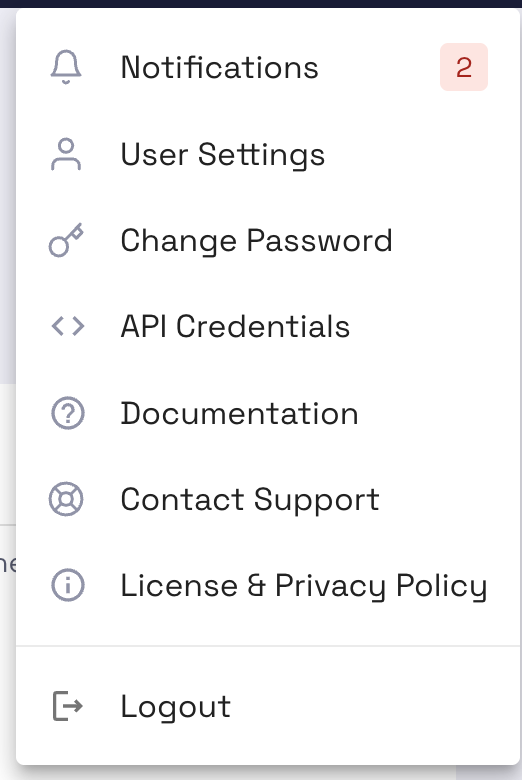
A drop-down menu in the top right corner allows users to adjust personal settings and access documentation. Options include Notifications, User Settings, Change Password, API Credentials, Documentation, Contact Support, License & Privacy Policy. The menu also provides the option to log out.
The Notifications section shows alerts, such as invitations to join a company.
The Notifications section shows alerts, such as invitations to join a company.
The User Settings section lets users edit Personal Information (Name, Email, Company, Country, Phone Number), User Interface (Language, Units of Measurement, Date Format, Advance Features view), and Email Preferences (Field Alerts, Marketing Communications).
Users may define various data components to be expressed in metric (SI units) or imperial units (inch, feet, acre, Fahrenheit). The current languages are English, Spanish, French, Dutch, German, Italian, and Arabic. More languages are foreseen to be added in due course as well.
The Documentation section provides users with more detailed instructions with documents like the User Manual (similar information to this course), Quick Start tutorials, API instructions, and Other resources (YouTube and LinkedIn).
Organisation
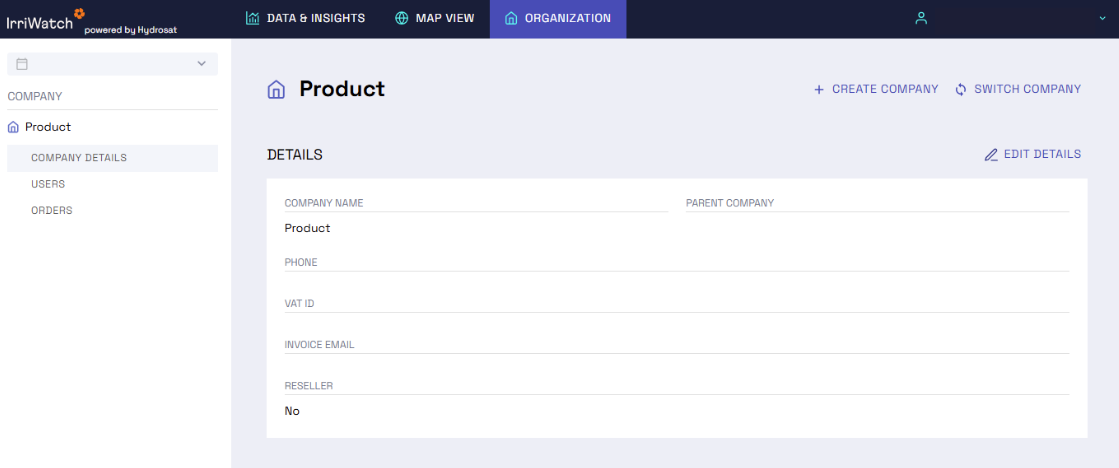
Using the left side panel, users can edit or add to the Company Details, Users, and Orders. Managers can review and edit the Company details such as Name, Parent Company, Address, Phone, VAT ID, Invoice Email, and Reseller status (yes/no).
In the upper right corner, there are also options to Create Company or Switch Company, in case the user has access to more than one company.
In the upper right corner, there are also options to Create Company or Switch Company, in case the user has access to more than one company.
A Manager or Editor within the organization can view a comprehensive overview of all Users, including their email, role, advanced graph views, and last login details. They can also access information about Orders, such as the order code, status, area, number of fields, price, and subscription dates.
Managers and Editors have the possibility of inviting users to their company. This is done by clicking ‘Invite user’ and entering the email address of the user. This person will receive an email. By clicking the next to a username, it is possible to change the role of the user or delete the user from the company.
For more IrriWatch | Advisor:
Learn more about the features, data and uses of IrriWatch | Advisor.
Help us
Improve
Your feedback helps us make our Academy more useful. Tell us about your experience and what you'd like to see next.